Specz ISP Initial Setup
Network Interfaces#
Setup wan and lan interfaces. lan network is for your subscriber network. wan network is the internet source
- To access the web gui you need to login to Specz ISP. Login to console.
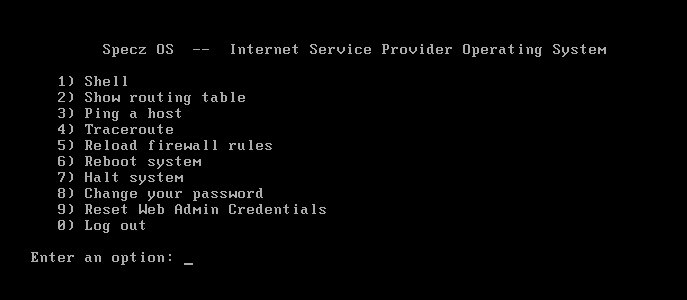
- Select 1 to open the shell and type ifconfig. You should see the ip address of Specz ISP.
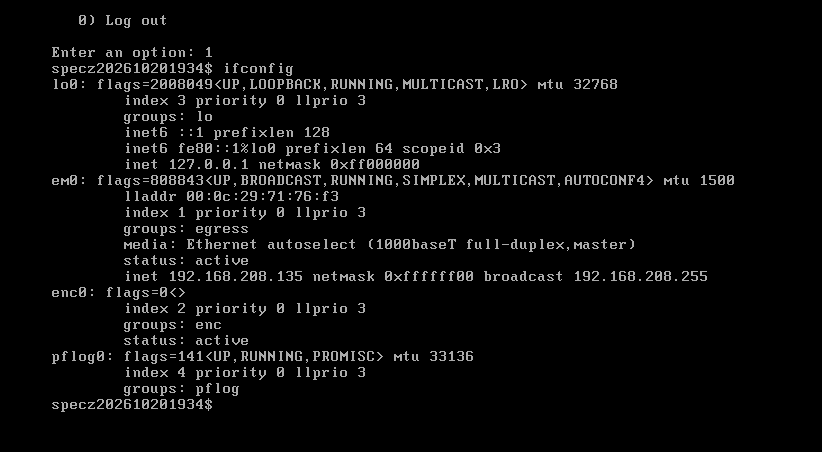
- Skip this step if you have the ip address from step 2. In case you don't have an ip address on the available interface of your machine. do the steps below as root(assuming lan interface is connected to network 192.168.188.0/24 and interface is em1.
echo "inet 192.168.188.1 255.255.255.0" > /etc/hostname.em1
sh /etc/netstart- Open the browser and go to https://192.168.188.1:8443. It uses a self signed cert so just continue or proceed when warned by the browser.
- Go to Network -> Network Interfaces and configure for wan interface by clicking the New button on the upper right corner. Select external as type and enter the wan gateway. If this is the first wan interface check the "Default Gateway" checkbox and then submit.
- Click new again to configure the lan interface. lan interface is internal type.
- Click apply changes at the top of the page.
DHCP server for LAN#
- Go to Services -> DHCP Server and then click New
- Configure the DHCP server. See sample below.
Name: mydhcp
Interface: lan
Subnet: 192.168.188.0
Netmask: 255.255.255.0
Range Start: 192.168.188.100
Range End: 192.168.188.200
Routers: 192.168.188.1
Domain: mydomain.local
Domain Name Servers: 192.168.188.1, 8.8.8.8
All remaining fields are optional. Click submit
- Click apply changes at the top of the page. You should see the status of dhcp server running.
DNS server configuration#
- Go to Services -> Unbound DNS and click new.
- Configure the DNS server. See sample below.
Name: mydns
Interface: all
TLS Cert Bundle: /etc/ssl/cert.pem
Access Control: 192.168.188.0/24 allow
Hide Identity: checked
Hide Version: checked
Prefetch: checked
Local Data: <optional>
Forward Zone Name: .
Forward TLS Upstream: checked
Forward Addr: 1.1.1.1@853,1.0.0.1@853,9.9.9.9@853,149.112.112.112@853,8.8.8.8,8.8.4.4
Click submit and click apply changes at the top of the page.